import numpy as np
from affine import Affine

from planetarypy.geo import (
    pixel_to_xy,
    xy_to_pixel,
    pixel_to_lonlat,
    lonlat_to_pixel,
    xy_to_lonlat,
    lonlat_to_xy,
    image_azimuth,
    image_azimuth_cw_from_right,
    pixel_resolution,
)Geospatial Utilities for Planetary Images
The planetarypy.geo module provides coordinate transforms for planetary image data — converting between pixel coordinates, map-projected coordinates, and geographic (lon/lat) coordinates.
It is built on rasterio and pyproj (no GDAL required) and works with both Earth and planetary CRS (Mars, Moon, etc.).
ImportantRequires the HiRISE package
This page uses functionality that ships separately as of planetarypy 0.82.0. Install it with pip install "planetarypy[hirise]" (or pip install planetarypy-hirise); a core-only install will not have it.
Pixel ↔︎ Map Coordinates
Every georeferenced image has an affine transform that maps pixel (sample, line) to map-projected (x, y) coordinates. This is a simple 2×3 matrix — no CRS needed.
# A Mars equirectangular image: 200 m/pixel, origin at x=-50km, y=100km
transform = Affine(200.0, 0.0, -50000.0,
                   0.0, -200.0, 100000.0)

# Pixel (100, 50) → map coordinates
x, y = pixel_to_xy(transform, sample=100, line=50)
print(f"Pixel (100, 50) → x={x:.0f} m, y={y:.0f} m")
Pixel (100, 50) → x=-29900 m, y=89900 m# And back: map coordinates → pixel
s, l = xy_to_pixel(transform, x, y)
print(f"x={x:.0f}, y={y:.0f} → pixel ({s:.0f}, {l:.0f})")x=-29900, y=89900 → pixel (100, 50)# Works with arrays too — convert an entire grid of pixels
samples = np.array([0, 50, 100, 150, 200])
lines = np.array([0, 0, 0, 0, 0])
xs, ys = pixel_to_xy(transform, samples, lines)
print("Samples:", samples)
print("X coords:", xs)Samples: [ 0 50 100 150 200]
X coords: [-49900. -39900. -29900. -19900. -9900.]# Get pixel resolution from the transform
res_x, res_y = pixel_resolution(transform)
print(f"Pixel resolution: {res_x:.0f} × {res_y:.0f} m")Pixel resolution: 200 × 200 mMap Coordinates ↔︎ Geographic (Lon/Lat)
To go from map-projected coordinates to lon/lat (or vice versa), you need a CRS. The geo module uses pyproj under the hood and automatically derives the correct geographic CRS from the projected CRS — so it works for any planetary body, not just Earth.
Planetary bodies use IAU CRS codes (supported by GDAL, ISIS, and pyproj). The convention is IAU_2015:{body_id}XX where the body ID follows the NAIF convention (e.g. Mars = 499, Moon = 301).
from pyproj import CRS as ProjCRS

# The old way: raw proj4 string (works but fragile, easy to get radius wrong)
mars_manual = ProjCRS.from_proj4("+proj=eqc +lat_ts=0 +lon_0=0 +R=3396190 +units=m")
print(f"Manual proj4: '{mars_manual.name}'")  # → 'unknown' — no metadata!

# The better way: IAU 2015 CRS codes
# 49910 = Mars (NAIF body 499) + equirectangular sphere ocentric (suffix 10)
mars_equirect = ProjCRS.from_authority("IAU_2015", 49910)
print(f"IAU code:     '{mars_equirect.name}'")

# The proj4 CRS is just math with no identity — pyproj can't even name it.
# The IAU code carries body name, projection, and datum. It's what GDAL,
# ISIS, and the PDS4 standard use. Always prefer IAU codes.

# Both produce the same coordinates:
lon, lat = xy_to_lonlat(mars_equirect, x=1_000_000, y=500_000)
print(f"\nx=1000km, y=500km → lon={lon:.2f}°, lat={lat:.2f}°")
Manual proj4: 'unknown'
IAU code: 'Mars (2015) - Sphere / Ocentric / Equirectangular, clon = 0'
x=1000km, y=500km → lon=16.87°, lat=8.44°# Roundtrip: lon/lat → projected → lon/lat
x2, y2 = lonlat_to_xy(mars_equirect, lon=45.0, lat=-10.0)
lon2, lat2 = xy_to_lonlat(mars_equirect, x2, y2)
print(f"lon=45°, lat=-10° → x={x2:.0f}, y={y2:.0f} → lon={lon2:.4f}°, lat={lat2:.4f}°")lon=45°, lat=-10° → x=2667361, y=-592747 → lon=45.0000°, lat=-10.0000°# Mars north polar stereographic — IAU code 49930
mars_npole = ProjCRS.from_authority("IAU_2015", 49930)
print(f"CRS: {mars_npole.name}")
x, y = lonlat_to_xy(mars_npole, lon=45.0, lat=85.0)
print(f"North polar region: lon=45°, lat=85° → x={x:.0f} m, y={y:.0f} m")
lon_back, lat_back = xy_to_lonlat(mars_npole, x, y)
print(f"Back to geographic: lon={lon_back:.4f}°, lat={lat_back:.4f}°")
# Some useful IAU 2015 codes:
print("\nCommon planetary CRS codes:")
for code, desc in [(49900, "Mars geographic"),
(49910, "Mars equirectangular"),
(49930, "Mars north polar"),
(30100, "Moon geographic"),
(30110, "Moon equirectangular"),
(60600, "Enceladus geographic")]:
c = ProjCRS.from_authority("IAU_2015", code)
print(f" IAU_2015:{code} → {c.name}")CRS: Mars (2015) - Sphere / Ocentric / North Polar
North polar region: lon=45°, lat=85° → x=209701 m, y=-209701 m
Back to geographic: lon=45.0000°, lat=85.0000°
Common planetary CRS codes:
IAU_2015:49900 → Mars (2015) - Sphere / Ocentric
IAU_2015:49910 → Mars (2015) - Sphere / Ocentric / Equirectangular, clon = 0
IAU_2015:49930 → Mars (2015) - Sphere / Ocentric / North Polar
IAU_2015:30100 → Moon (2015) - Sphere / Ocentric
IAU_2015:30110 → Moon (2015) - Sphere / Ocentric / Equirectangular, clon = 0
IAU_2015:60600 → Titan (2015) - Sphere / OcentricPixel ↔︎ Lon/Lat (Full Chain)
The pixel_to_lonlat and lonlat_to_pixel functions combine the affine transform and CRS reprojection into a single call. They accept a rioxarray DataArray directly — because rioxarray stores both the affine transform and the CRS as metadata inside the DataArray (in the spatial_ref coordinate). This means the DataArray is fully self-describing: you don’t need to pass the CRS or transform separately.
Let’s create a synthetic Mars image to demonstrate:
import math

import xarray as xr
import rioxarray  # noqa: F401 — activates .rio accessor

# Create a synthetic 500x500 "image" over Gale Crater region on Mars
# Equirectangular projection, 200 m/pixel
# Centered roughly on Gale Crater: lon=137.4°, lat=-4.6°
pixel_size = 200  # meters
nx, ny = 500, 500

# Affine transform: origin at the upper-left corner in projected coords
# For Mars equirectangular: x = lon * R * pi/180, y = lat * R * pi/180
R_mars = 3396190  # meters
center_x = 137.4 * math.pi / 180 * R_mars
center_y = -4.6 * math.pi / 180 * R_mars
origin_x = center_x - (nx / 2) * pixel_size
origin_y = center_y + (ny / 2) * pixel_size

transform = Affine(pixel_size, 0.0, origin_x,
                   0.0, -pixel_size, origin_y)

# Build coordinate arrays from the transform (pixel centers)
xs = origin_x + (np.arange(nx) + 0.5) * pixel_size
ys = origin_y - (np.arange(ny) + 0.5) * pixel_size

# Create DataArray with proper coordinates and CRS
data = np.random.rand(ny, nx).astype(np.float32)
da = xr.DataArray(data, dims=["y", "x"], coords={"x": xs, "y": ys})
da = da.rio.set_spatial_dims(x_dim="x", y_dim="y")
da = da.rio.write_crs("IAU_2015:49910")
da = da.rio.write_transform(transform)

print(f"Image: {nx}×{ny} pixels, {pixel_size} m/pixel")
print(f"CRS: {da.rio.crs}")
print(f"Bounds: {da.rio.bounds()}")
Image: 500×500 pixels, 200 m/pixel
CRS: PROJCS["Mars (2015) - Sphere / Ocentric / Equirectangular, clon = 0",GEOGCS["Mars (2015) - Sphere / Ocentric",DATUM["Mars (2015) - Sphere",SPHEROID["Mars (2015) - Sphere",3396190,0,AUTHORITY["IAU","49900"]],AUTHORITY["IAU","49900"]],PRIMEM["Reference Meridian",0,AUTHORITY["IAU","49900"]],UNIT["degree",0.0174532925199433,AUTHORITY["EPSG","9122"]],AUTHORITY["IAU","49900"]],PROJECTION["Equirectangular"],PARAMETER["standard_parallel_1",0],PARAMETER["central_meridian",0],PARAMETER["false_easting",0],PARAMETER["false_northing",0],UNIT["metre",1,AUTHORITY["EPSG","9001"]],AXIS["Easting",EAST],AXIS["Northing",NORTH],AUTHORITY["IAU","49910"]]
Bounds: (8094343.439702274, -322663.6086072086, 8194343.439702274, -222663.6086072086)# The DataArray carries all the geo metadata — inspect it:
print(f"Transform: {da.rio.transform()}")
print(f"CRS: {da.rio.crs}")
print("Stored in: da.coords['spatial_ref']")
print("\nThis is why pixel_to_lonlat(da, ...) works without extra arguments —")
print("the DataArray knows its own coordinate system.")Is a raster’s CRS projected?
is_projected reports whether a raster’s CRS is projected (map units like metres) or geographic (degrees) — handy before assuming planar geometry. It accepts a file path, a rasterio dataset, or a rioxarray DataArray, and works on any GDAL-readable format.
from planetarypy.geo import is_projected

# `da` is map-projected (Mars equirectangular) → its CRS is projected
print(f"da CRS projected? {is_projected(da)}")
# pixel_to_lonlat: where is the center pixel on Mars?
center_sample, center_line = nx // 2, ny // 2
lon, lat = pixel_to_lonlat(da, sample=center_sample, line=center_line)
print(f"Center pixel ({center_sample}, {center_line}) → lon={lon:.2f}°, lat={lat:.2f}°")
print("(Expected: ~137.4°, ~-4.6° — Gale Crater)")
# Works with arrays — get lon/lat for the four corners
corners_s = np.array([0, nx-1, 0, nx-1])
corners_l = np.array([0, 0, ny-1, ny-1])
lons, lats = pixel_to_lonlat(da, sample=corners_s, line=corners_l)
for label, lo, la in zip(["UL", "UR", "LL", "LR"], lons, lats):
print(f" {label}: lon={lo:.2f}°, lat={la:.2f}°")from planetarypy.geo import is_within
# lonlat_to_pixel: which pixel is Gale Crater's central peak?
# (Aeolis Mons / Mt Sharp: lon=137.85°, lat=-5.08°)
s, l = lonlat_to_pixel(da, lon=137.85, lat=-5.08)
print(f"Mt Sharp (137.85°, -5.08°) → pixel ({s:.0f}, {l:.0f})")
# Bounds check
print(f" Within image: {is_within(da, lon=137.85, lat=-5.08)}")
# Something far away
print(f" Olympus Mons within image: {is_within(da, lon=226.2, lat=18.65)}")
# Roundtrip check
lon_rt, lat_rt = pixel_to_lonlat(da, sample=s, line=l)
print(f" Roundtrip: lon={lon_rt:.4f}°, lat={lat_rt:.4f}°")Mt Sharp (137.85°, -5.08°) → pixel (383, 392)
Within image: True
Olympus Mons within image: False
Roundtrip: lon=137.8504°, lat=-5.0808°With a real planetary image file, it’s even simpler — rioxarray reads the transform and CRS from the file:
import rioxarray as rxr

da = rxr.open_rasterio("my_hirise_dtm.tif").isel(band=0)

# Where is pixel (1000, 2000)?
lon, lat = pixel_to_lonlat(da, sample=1000, line=2000)

# Which pixel is Olympus Mons summit?
s, l = lonlat_to_pixel(da, lon=226.2, lat=18.65)
Image Azimuth Angles
Two conventions are provided for measuring angles between points in image space:
| Function | Zero direction | Rotation | Use case |
|---|---|---|---|
image_azimuth |
North (up) | Clockwise | Standard planetary science |
image_azimuth_cw_from_right |
East (right, 3 o’clock) | Clockwise | HiRISE rotation angles |
# Standard planetary science: clockwise from north
# A point directly to the east → 90°
az = image_azimuth(100, 100, 150, 100)
print(f"East: {az:.0f}°")

# Point to the southwest → 225°
az = image_azimuth(100, 100, 80, 120)
print(f"Southwest: {az:.0f}°")
East: 90°
Southwest: 225°# HiRISE convention: clockwise from 3 o'clock
# A point directly downward → 90°
az = image_azimuth_cw_from_right(100, 100, 100, 150)
print(f"Down (HiRISE): {az:.0f}°")
# A point directly upward → 270°
az = image_azimuth_cw_from_right(100, 100, 100, 50)
print(f"Up (HiRISE): {az:.0f}°")Down (HiRISE): 90°
Up (HiRISE): 270°The Point Class
Why a custom Point?
Existing geospatial libraries each cover part of the planetary image workflow but none cover it all:
| Library | What it does | What it doesn’t do |
|---|---|---|
Shapely Point |
Geometry operations (intersect, buffer, distance) | No CRS, no pixel transforms, no image bounds |
pyproj Transformer |
CRS reprojection | No point object — bare tuples only |
| rasterio | rowcol() / xy() pixel↔︎map |
No point class, no lon/lat, no bounds check |
| geopandas | CRS-aware geometries | Heavyweight for a single point |
The planetarypy Point combines what planetary scientists actually need in one object: create a point from lon/lat (or pixel coordinates), project it, check if it’s in an image, compute azimuths — all CRS-aware, all working with IAU planetary bodies.
For GIS interop, you can always hand off to Shapely:
from shapely.geometry import Point as ShapelyPoint
shapely_pt = ShapelyPoint(p.lon, p.lat)
from planetarypy.geo import Point
# Create a point from geographic coordinates
mt_sharp = Point(lon=137.85, lat=-5.08, crs="IAU_2015:49900")
mt_sharpPoint(lon=137.8500, lat=-5.0800, crs='Mars (2015) - Sphere / Ocentric')# Project to Mars equirectangular
x, y = mt_sharp.to_xy("IAU_2015:49910")
print(f"Mt Sharp projected: x={x:.0f} m, y={y:.0f} m")
# Check if it's within our synthetic Gale Crater image
print(f"Within image: {mt_sharp.is_within(da)}")
# Get pixel coordinates in the image
s, l = mt_sharp.to_pixel(da)
print(f"Pixel: ({s:.0f}, {l:.0f})")Mt Sharp projected: x=8171017 m, y=-301115 m
Within image: True
Pixel: (383, 392)# Create a point from pixel coordinates — lon/lat auto-resolved
center = Point(sample=250, line=250, source=da)
print(f"Image center: {center}")
# Azimuth from center to Mt Sharp
mt_sharp_px = Point(lon=137.85, lat=-5.08, source=da)
az = center.azimuth_to(mt_sharp_px)
print(f"Azimuth from center to Mt Sharp: {az:.1f}° (CW from north)")Image center: Point(lon=137.4017, lat=-4.6017, sample=250, line=250, crs='Mars (2015) - Sphere / Ocentric / Equirectangular, clon = 0')
Azimuth from center to Mt Sharp: 136.9° (CW from north)# Point works for any location — check Olympus Mons is NOT in our image
olympus = Point(lon=226.2, lat=18.65, crs="IAU_2015:49900")
print(f"Olympus Mons within Gale image: {olympus.is_within(da)}")Olympus Mons within Gale image: False# Hand off to Shapely for GIS operations
shapely_pt = mt_sharp.to_shapely()
print(f"Shapely: {shapely_pt}")
print(f"Type: {type(shapely_pt).__module__}.{type(shapely_pt).__name__}")
shapely_pt # renders as SVG in JupyterShapely: POINT (137.85 -5.08)
Type: shapely.geometry.point.Point
Sun Direction Indicator
The planetarypy.plotting module provides add_sun_indicator and imshow_with_sun for displaying images with a sun direction overlay. The indicator expects the solar azimuth clockwise from image top (CW-from-top).
Azimuth conventions
Different data sources use different zero directions:
| Source | Convention | Zero direction | Convert to CW-from-top |
|---|---|---|---|
planetarypy.plotting |
CW from top | Up (12 o’clock) | Use directly |
HiRISE index (SUB_SOLAR_AZIMUTH) |
CW from right | Right (3 o’clock) | (az + 90) % 360 |
| Standard geographic | CW from north | North | Depends on image orientation |
The HiRISE convention (CW from 3 o’clock) is documented in the HiRISE EDR/RDR SIS and the ASU HiRISE glossary. Both SUB_SOLAR_AZIMUTH and NORTH_AZIMUTH use this convention.
import matplotlib.pyplot as plt
from planetarypy.plotting import imshow_with_sun, imshow_gray, add_sun_indicator
Verification with real HiRISE data
Let’s verify the sun indicator against a real HiRISE RDR browse image with clearly visible shadows. We’ll use ESP_013807_2035 — a mid-latitude observation with prominent crater shadows.
The browse image (.abrowse.jpg) is the map-projected RDR, so it uses the RDR index metadata. In HiRISE’s equirectangular RDRs, NORTH_AZIMUTH=270° (CW from right), meaning north has been rotated to the top of the image.
from planetarypy.instruments.mro.hirise import get_browse, get_metadata, sun_azimuth_from_top

# Look up solar geometry from the HiRISE RDR index
meta = get_metadata("ESP_013807_2035_RED")

print(f"Observation: {meta['PRODUCT_ID']}")
print(f"SUB_SOLAR_AZIMUTH: {meta['SUB_SOLAR_AZIMUTH']:.1f}° (CW from 3 o'clock)")
print(f"NORTH_AZIMUTH:     {meta['NORTH_AZIMUTH']:.1f}° (CW from 3 o'clock)")
print(f"INCIDENCE_ANGLE:   {meta['INCIDENCE_ANGLE']:.1f}°")
print(f"MAP_PROJECTION:    {meta['MAP_PROJECTION_TYPE']}")
Observation: ESP_013807_2035_RED
SUB_SOLAR_AZIMUTH: 129.3° (CW from 3 o'clock)
NORTH_AZIMUTH: 270.0° (CW from 3 o'clock)
INCIDENCE_ANGLE: 56.0°
MAP_PROJECTION: EQUIRECTANGULARimport matplotlib.image as mpimg
# Download the clean (unannotated) browse — better for image analysis
# Equivalent to: plp hibrowse --clean ESP_013807_2035_RED
browse_path = get_browse("ESP_013807_2035_RED", annotated=False)
img = mpimg.imread(str(browse_path))
print(f"Browse image: {browse_path.name}")
print(f"Size: {img.shape[1]}×{img.shape[0]} pixels")Browse image: ESP_013807_2035_RED.browse.jpg
Size: 2048×5959 pixels# imshow_gray: quick display with automatic percentile stretch
# HiRISE images are well-behaved — a gentle 0.5-99.5 stretch is usually enough
ax = imshow_gray(img, stretch="0.5,99.5", title="ESP_013807_2035 — full browse")
plt.show()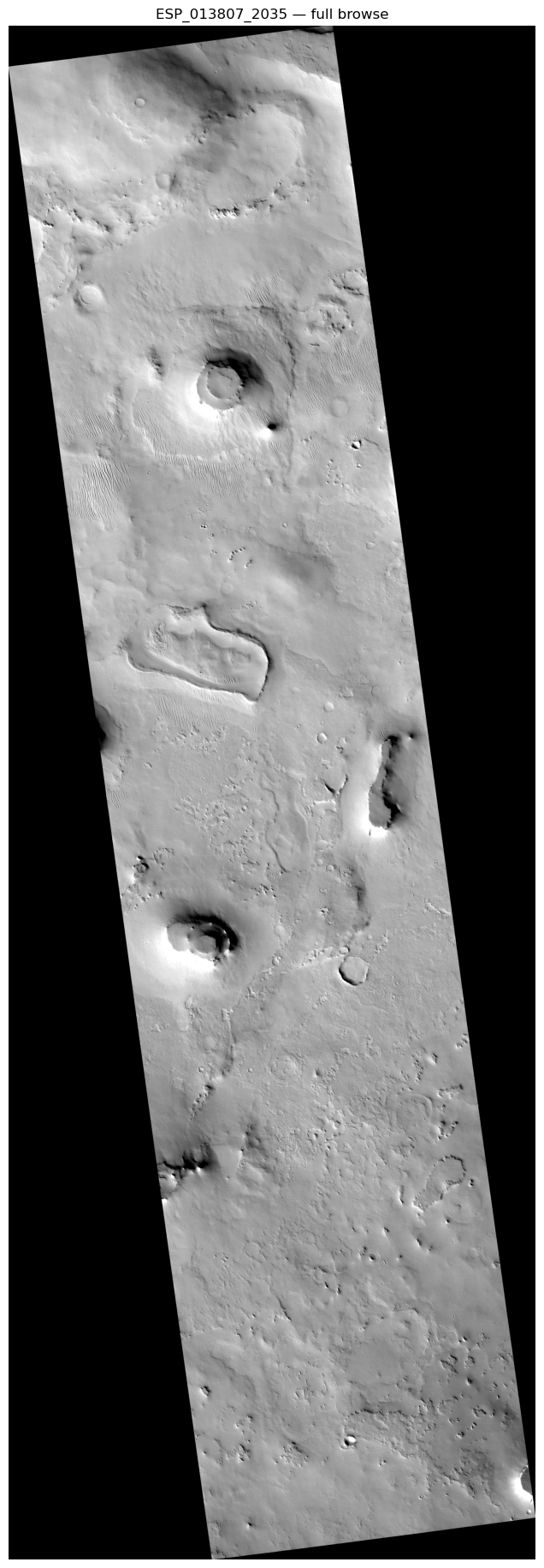
# Convert HiRISE azimuth to our plotting convention in one call
sun_az_from_top = sun_azimuth_from_top("ESP_013807_2035_RED")

print(f"HiRISE SUB_SOLAR_AZIMUTH: {meta['SUB_SOLAR_AZIMUTH']:.1f}° (CW from right)")
print(f"Converted to CW from top: {sun_az_from_top:.1f}°")
print("\nShadows should point AWAY from the sun indicator.")
HiRISE SUB_SOLAR_AZIMUTH: 129.3° (CW from right)
Converted to CW from top: 219.3°
Shadows should point AWAY from the sun indicator.# Crop a window with clear crater shadows (middle of the image)
window = img[1500:2500, 400:1600]
fig, ax = plt.subplots(figsize=(10, 8))
imshow_with_sun(window, sun_az_from_top, stretch="0.5,99.5",
title=f"ESP_013807_2035 — SUB_SOLAR_AZIMUTH={meta['SUB_SOLAR_AZIMUTH']:.1f}° → {sun_az_from_top:.1f}° from top",
ax=ax)
fig.tight_layout()
plt.show()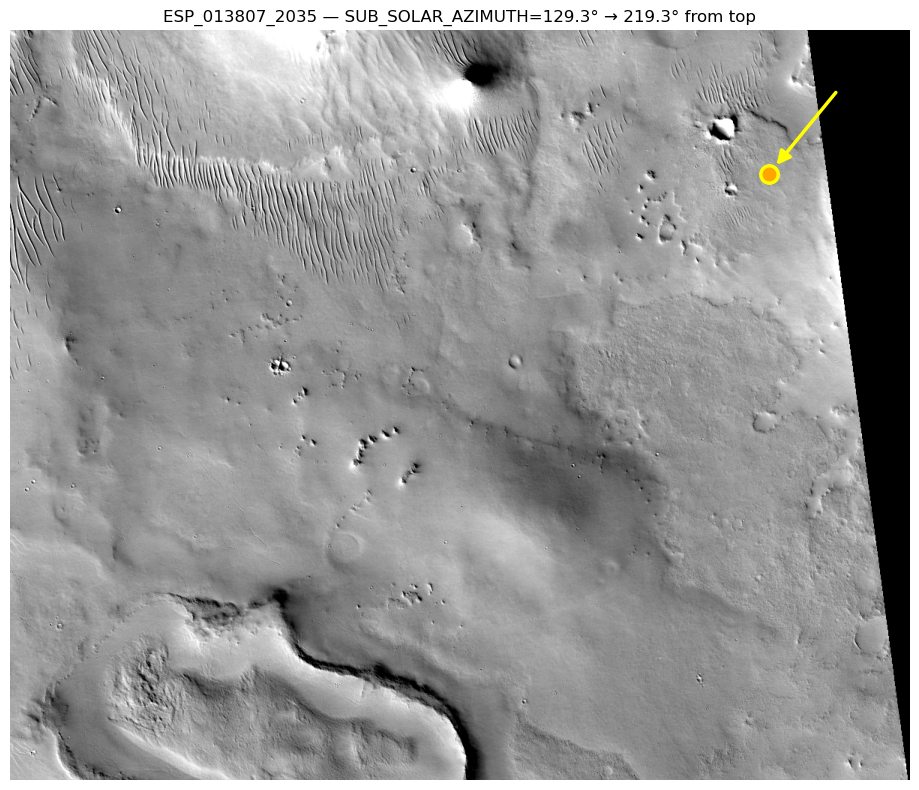
# add_sun_indicator can be added to any existing axes
# Useful when you've already built a plot with other overlays
fig, ax = plt.subplots(figsize=(10, 8))
ax.imshow(window, cmap="gray")
ax.set_title("Manual plot + sun indicator added separately")
add_sun_indicator(ax, sun_az_from_top, position="upper left")
plt.show()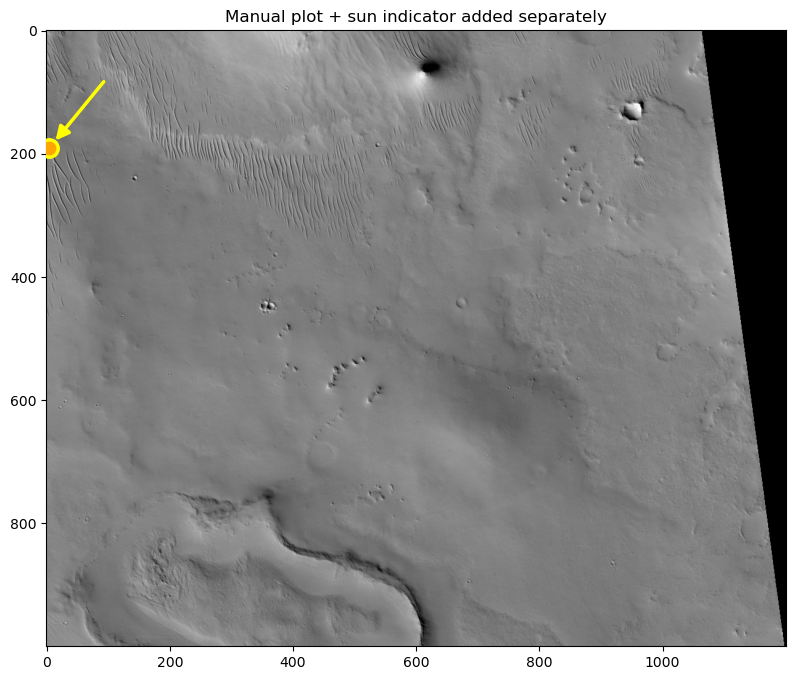
Next Steps
We are planning to incorporate a planetarypy CRS module written by Christian Tai Udovicic that will enable easy access to all major solar system CRSs.
Other planned features:
- Verify the sun indicator convention for unprojected EDR images (RDR convention is verified:
(hirise_az + 90) % 360) - Independent sun azimuth calculation via SPICE to validate index values
- Automatic sun indicator from PDS index metadata (no manual conversion)
- Sun indicator support for CTX images (using
SUB_SOLAR_AZIMUTHfrom CTX index)