spice-kernel-db
SPICE kernel management tool with multi-server support, one-command acquisition, and optional deduplication
What is this?
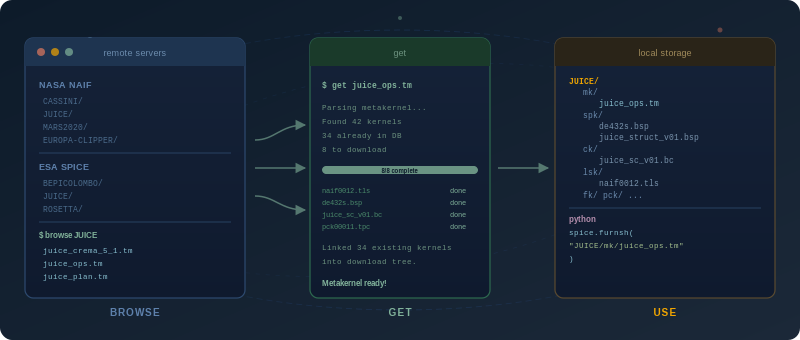
spice-kernel-db is a tool for getting and managing NAIF SPICE kernels across planetary missions. The primary workflow is: set up a mission, browse remote metakernels, and get everything you need with one command.
The tool supports multiple SPICE servers (NASA NAIF and ESA SPICE), downloads kernels in parallel, automatically creates symlinks organized by mission, and generates ready-to-use metakernels. You can browse what’s available on remote servers before downloading, and the acquisition process handles all dependencies automatically.
After acquisition, the metakernel is immediately usable — existing kernels already in the database are automatically linked into the download tree so all relative paths resolve correctly. Optional content-addressed deduplication (using SHA-256 hashing) can further reduce storage when working with multiple missions.
Installation
pip install spice-kernel-dbOr with conda:
conda install -c michaelaye spice-kernel-dbFrom source:
git clone https://github.com/michaelaye/spice-kernel-db
cd spice-kernel-db
pip install -e ".[dev]"
Quick taste
# First run: configure storage path (or re-run with --setup)
spice-kernel-db config

# Add a mission (interactive dialog chooses server and base URL)
spice-kernel-db mission add

# Browse available remote metakernels
spice-kernel-db browse JUICE

# Get kernels from a remote metakernel (parallel downloads, auto-symlink, ready to use)
spice-kernel-db get https://naif.jpl.nasa.gov/pub/naif/JUICE/kernels/mk/juice_crema_5_1.tm

# Use the locally rewritten metakernel with spiceypy
spiceypy.furnsh("/your/storage/path/symlinks/JUICE/juice_crema_5_1.tm")
See the Usage Guide for the full walkthrough.
Public API
These are the names spice_kernel_db exports, and the list spice_kernel_db.__all__ carries. They are the stability promise: within a major version they keep their names and the meaning of their arguments, so a dependent such as planetarypy can pin spice-kernel-db>=0.30,<1. Everything else in the package (spice_kernel_db.db, .remote, .config, .cli) is internal and may change in any release. The API reference is generated from these names’ docstrings.
from spice_kernel_db import (
    # the database
    KernelDB, RegistryRow,
    # one call against the configured database
    check, get, metakernels_covering, register_metakernel, resolve_metakernel, scan,
    # configuration
    Config, ConfigError, ensure_config, kernel_roots, add_root, remove_root,
    # metakernel files
    parse_metakernel, parse_metakernel_text,
    # exceptions
    AmbiguousKernelRoot, AmbiguousMetakernel, ConcurrentModificationError,
    LegacyDatabaseFound, MetakernelNotTracked, MetakernelUnreachableError,
)
Hosting the CLI. A program with its own Typer CLI mounts skd’s command tree as one of its groups with app.add_typer(spice_kernel_db.cli.app, name=...) (planetarypy does this as plp spice), maps the exceptions that escape its app with spice_kernel_db.cli.exit_code(exc) (1 for an untracked metakernel or a concurrent modification, 2 for an ambiguous name or root or an unreachable source, 78 for a config error or a legacy database, None for anything that is not skd’s), and runs the app inside spice_kernel_db.cli.logging_to_stderr(), which prints the library’s warnings (INFO under -v) as bare lines on stderr for that run only. Those three names are the host contract and change only with a major version; the rest of spice_kernel_db.cli is internal.
The library is quiet: no function or method prints unless you hand it a rich.console.Console (KernelDB(console=...), get(console=...)), and warnings go through the spice_kernel_db logger, so a script sees them only if it configures logging. The CLI is this API plus a console and one log handler.