spice-kernel-db
SPICE kernel management tool with multi-server support, one-command acquisition, and optional deduplication
What is this?
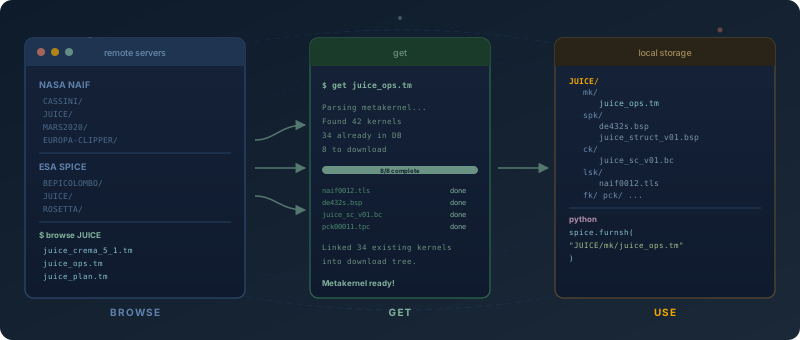
spice-kernel-db is a tool for getting and managing NAIF SPICE kernels across planetary missions. The primary workflow is: set up a mission, browse remote metakernels, and get everything you need with one command.
The tool supports multiple SPICE servers (NASA NAIF and ESA SPICE), downloads kernels in parallel, automatically creates symlinks organized by mission, and generates ready-to-use metakernels. You can browse what’s available on remote servers before downloading, and the acquisition process handles all dependencies automatically.
After acquisition, the metakernel is immediately usable — existing kernels already in the database are automatically linked into the download tree so all relative paths resolve correctly. Optional content-addressed deduplication (using SHA-256 hashing) can further reduce storage when working with multiple missions.
Installation
pip install spice-kernel-dbOr with conda:
conda install -c michaelaye spice-kernel-dbFrom source:
git clone https://github.com/michaelaye/spice-kernel-db
cd spice-kernel-db
pip install -e ".[dev]"
Quick taste
# First run: configure storage path (or re-run with --setup)
spice-kernel-db config

# Add a mission (interactive dialog chooses server and base URL)
spice-kernel-db mission add

# Browse available remote metakernels
spice-kernel-db browse JUICE

# Get kernels from a remote metakernel (parallel downloads, auto-symlink, ready to use)
spice-kernel-db get https://naif.jpl.nasa.gov/pub/naif/JUICE/kernels/mk/juice_crema_5_1.tm

# Use the locally rewritten metakernel with spiceypy
spiceypy.furnsh("/your/storage/path/symlinks/JUICE/juice_crema_5_1.tm")
See the Usage Guide for the full walkthrough.